
If you have tested successfully xmlFM, it is now time to install it ! And this is extremely easy.
Follow these 3 steps :
- Open your own copy of xmlFM, go in the script menu, and copy the complete folder « GetXMLNode scripts »
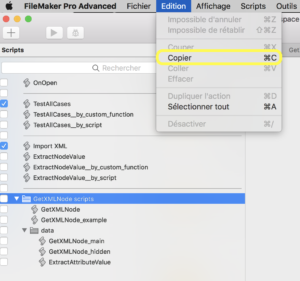
- Open the script viewer of your own FileMaker document, and paste the folder scripts (see step 1)
- You should now connect your scripts to xmlFM. You can get largely inspired by the script « GetXMLNode_example« .
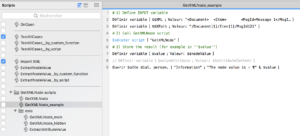
If you prefer to create from scratch, here are the main steps :- Create your own script
- Define the input variables :
- « $$XML » should contain the XML document to parse
- « $$XPath » is the path to the element content you want to extract. Its syntax consisting of a series of xml nodes formatted as follows :
/nodeName[instanceNumber]
- Call scripts « GetXMLNode »
- The results are in the following variables :
- « $$nodeValue » contains the requested element content pointed by $$XPath.
It will contain « » in case of error. - « $$attributeContent » contains the attributes of the element pointed by $$XPath.
- « $$nodeValue » contains the requested element content pointed by $$XPath.