Script or calculation field

xmlFM has been originally created to be used through scripts. This is an extremely easy and powerful solution, that can be integrated to a large set os usage.

From now, it is possible to extract any XML information from a « calculation field ». Indeed, we have developed specific « customized function » that can be integrated in your computation filed !

Hope you will enjoy this new powerful option !

Version history

[2019.04.17] v1.4
– corrected : incorrect parameter extraction (with « custom function ») for last item in list (thanks to Henry)
– improved : adding more tests scenarios

[2018.01.03] v1.3
– improved : documentation and sample code for « custom functions »

[2018.12.13] v1.2
– added : example to extract the node value as <Account No= »17-440077-01″ Name=« RICHARD JONES » > (thanks to Brian)

[2018.04.17] v1.1
– corrected : handling of occurence within last node element (thanks to « Vortex »)
– added : now handles empty-element tag as <line-break /> or <line break= »final » />

[2018.04.15] v1.0
Initial release

How to install ?

If you have tested successfully xmlFM, it is now time to install it ! And this is extremely easy.
Follow these 3 steps :

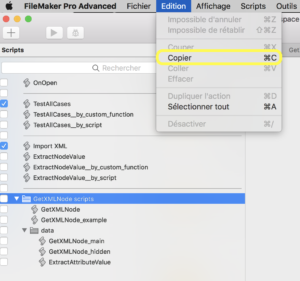
  1. Open your own copy of xmlFM, go in the script menu, and copy the complete folder « GetXMLNode scripts »
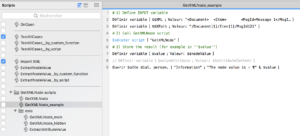
  2. Open the script viewer of your own FileMaker document, and paste the folder scripts (see step 1)
  3. You should now connect your scripts to xmlFM. You can get largely inspired by the script « GetXMLNode_example« .

    If you prefer to create from scratch, here are the main steps :

    1. Create your own script
    2. Define the input variables :
      1. « $$XML » should contain the XML document to parse
      2. « $$XPath » is the path to the element content you want to extract. Its syntax consisting of a series of xml nodes formatted as follows :

        /nodeName[instanceNumber]

    3. Call scripts « GetXMLNode »
    4. The results are in the following variables :
      1. « $$nodeValue » contains the requested element content pointed by $$XPath.
        It will contain «  » in case of error.
      2. « $$attributeContent » contains the attributes of the element pointed by $$XPath.

Version compatibility

As xmlFM is based only on scripts, it has a large compatibility with FileMaker products.

Recommended version

The recommended version is V12.0 and upper.
Compatible with Pro, Advanced, Server and Go version.

xmlFM has been successfully tested on latest FileMaker 16.0 (MacOS 10.13 and PC Windows 7 x64).

Minimum version

It is possible to run xmlFM on FileMaker v8.0 or upper with minor modification. Ask if you need it.